Blog

  • 6.2. Personio Integration

    TalentUp Salary Benchmarking Platform offers seamless integrations with leading HR Information Systems (HRIS) to help organizations automate data flows, reduce manual work, and maintain accurate workforce information. By connecting your HRIS directly to TalentUp, you ensure your benchmarking insights remain up-to-date and aligned with real employee data.

    Currently, TalentUp supports integrations with:

    • Personio
    • AlexisHR

    Data Security & Privacy

    TalentUp adheres to strict security standards in every integration. All data transfers are encrypted, access is restricted, and no information is shared with third parties. Integrations operate under GDPR-compliant processes and respect your organization’s data governance policies.


    Personio HRIS: Linking Your Account

    Before starting, ensure you meet the following requirements for the integration to work:

    To set up the integration with Personio, your account must have access rights to these roles:

    • Account configuration > API is required to create the API key.
    • Account configuration > Marketplace Integration – needed to view the API key credentials.

    To verify your access:

    1. 1. Click the Settings button in the sidebar.
      If you cannot see this button, it may indicate that you need additional permissions.

      [IMG1]https://talentup.io/apidocumentation/wp-content/uploads/2025/12/1.png[IMG2]
    2. 2. Confirm that the API credentials tab appears under the Integrations section in Settings.

      [IMG1]https://talentup.io/apidocumentation/wp-content/uploads/2025/12/2.png[IMG2]
    3. 3. Click the Marketplace button in the sidebar. If you cannot see this button, it may be due to insufficient permissions.

      [IMG1]https://talentup.io/apidocumentation/wp-content/uploads/2025/12/3.png[IMG2]
    4. 4. Ensure you can click See connected integrations.

      [IMG1]https://talentup.io/apidocumentation/wp-content/uploads/2025/12/4.png[IMG2]

    If you cannot follow these steps, you will not be able to set up this integration. Please ask a system administrator to assign these access rights to your account.


    Find Your API Domain

    Your API domain is the same as the one used to log in to Personio.

    1. 1. Open your Personio login page.
    2. 2. You should see your domain in the browser URL.

      [IMG1]https://talentup.io/apidocumentation/wp-content/uploads/2025/12/5.png[IMG2]


    Generate Your API Credentials

    1. 1. Log into your Personio account.
    2. 2. Open the API credentials page. Use the connection guide or replace <your subdomain> with your own:

      https://<yoursubdomain>.personio.de/configuration/marketplace/connected

      [IMG1]https://talentup.io/apidocumentation/wp-content/uploads/2025/12/6.png[IMG2]
    3. 3. Click Generate new credential.

      [IMG1]https://talentup.io/apidocumentation/wp-content/uploads/2025/12/7.png[IMG2]
    4. 4. Enter a name for your connection.

      [IMG1]https://talentup.io/apidocumentation/wp-content/uploads/2025/12/8.png[IMG2]

      Please review the required access rights during the connection flow.

      This is just an example. Check the scopes required for your integration in your flow
    5. 5. Enable the required access rights in Personio:

      [IMG1]https://talentup.io/apidocumentation/wp-content/uploads/2025/12/9.png[IMG2]
    6. 6. Enable the necessary readable employee attributes:

      [IMG1]https://talentup.io/apidocumentation/wp-content/uploads/2025/12/10.png[IMG2]
    7. 7. Click Generate new credential:

      [IMG1]https://talentup.io/apidocumentation/wp-content/uploads/2025/12/11.png[IMG2]

    Access Your API Credentials

    1. 1. Open the Connected Integrations page using the link from the guide or your subdomain:

      https://<yoursubdomain>.personio.de/configuration/marketplace/connected
    2. 2. Find the API credential you just created and click it. A new window will open on the right.

      [IMG1]https://talentup.io/apidocumentation/wp-content/uploads/2025/12/12.png[IMG2]
    3. 3. Select the API credentials tab at the top:

      [IMG1]https://talentup.io/apidocumentation/wp-content/uploads/2025/12/13.png[IMG2]
    4. 4. Click Reset client ID and API secret:

      [IMG1]https://talentup.io/apidocumentation/wp-content/uploads/2025/12/14.png[IMG2]
    5. 5. You should now see your API credentials:

      [IMG1]https://talentup.io/apidocumentation/wp-content/uploads/2025/12/15.png[IMG2]
    6. 6. Copy the Client ID and Client Secret and paste them into the connection flow. Then click Set up integration.

      [IMG1]https://talentup.io/apidocumentation/wp-content/uploads/2025/12/16.png[IMG2]
  • 6.1. TalentUp Integrations

    TalentUp Salary Benchmarking Platform offers seamless integrations with leading HR Information Systems (HRIS) to help organizations automate data flows, reduce manual work, and maintain accurate workforce information. By connecting your HRIS directly to TalentUp, you ensure your benchmarking insights remain up-to-date and aligned with real employee data.

    Currently, TalentUp supports integrations with:

    • Personio
    • AlexisHR
  • 5.1. How to Use TalentUp Salary Benchmarking to Achieve Salary Transparency

    Salary transparency is more than a trend—it’s a foundation for trust, fairness, and employee engagement. Transparent compensation practices have been shown to improve retention, reduce pay gaps, and strengthen employer branding. However, implementing transparency requires more than just publishing salary ranges; it requires reliable data, a clear framework, and consistent communication.

    TalentUp helps organizations achieve transparency by providing market-aligned benchmarks and structured compensation models. Here’s how to use it step-by-step.


    Step 1: Set a Salary Framework

    The first step toward salary transparency is building a clear and consistent salary framework. TalentUp gives you the data you need to define structured compensation plans that are fair, scalable, and easy to communicate.

    Use TalentUp to:

    • Create salary bands by role and level
      For example, you can define a range for Junior Software Engineer in Berlin and a separate one for Senior Marketing Manager in Madrid. Each role should have its own structured range based on TalentUp’s market data.
    • Design consistent compensation progression
      Use percentile benchmarks (P25, P50, P75, P90) to illustrate how pay evolves with performance, experience, or tenure. For example, junior employees may start at P50, with top performers advancing to P75 over time.
    • Define policies for bonuses, benefits, and equity
      Go beyond base salary by using TalentUp insights to establish standard practices for variable pay and perks. This includes things like remote work allowances, commissions, or stock option eligibility based on role or level.

    With a clear structure in place, your salary decisions become easier to explain and defend—internally and externally.


    Step 2: Back Salary Decisions with Data

    One of the most powerful benefits of TalentUp is that it allows you to justify salary decisions with real market evidence. This brings objectivity into conversations that are often emotionally charged.

    Use TalentUp data to:

    • Justify hiring offers
      Show candidates how their offer aligns with the market—e.g., “We’re offering you P75 for your role in this location.” This builds confidence and reduces negotiation friction.
    • Support promotion-based raises
      When an employee is promoted, TalentUp data can help determine what raise is appropriate for the new level, ensuring consistency across departments.
    • Defend internal equity decisions
      If employees question their pay relative to others, percentile-based benchmarks from TalentUp offer a clear explanation: “You are paid at the market median (P50) for your level and experience.”

    These data-backed justifications reduce ambiguity, promote fairness, and increase trust in the organization’s compensation practices.


    Step 3: Communicate Clearly

    Transparency is not just about publishing numbers—it’s about effective communication. TalentUp gives HR teams the structure and data they need to confidently engage with employees around compensation.

    Here’s how:

    • Share salary ranges, not exact figures
      Providing bands based on market data (e.g., €50,000–€60,000 for a Mid-Level Product Manager) promotes openness without exposing sensitive individual data.
    • Educate managers on how salaries are set
      Equip your managers with context from TalentUp so they can explain to their teams why someone is in a particular range or percentile.
    • Use percentile language to reinforce fairness
      Phrases like “You’re currently at the P75 for your position in Madrid” help employees understand their placement and performance relative to the market.

    Clear, consistent messaging increases employee understanding and decreases salary-related dissatisfaction or confusion.


    Step 4: Train Managers

    Managers play a key role in delivering compensation messages. TalentUp allows you to give them the tools they need to explain pay decisions with confidence and consistency.

    Here’s how to make the most of this:

    • Use TalentUp data in performance and compensation calibrations
      During review cycles, equip managers with real-time benchmarks to ensure raises and bonuses are market-aligned and equitable.
    • Provide managers access or tailored reports
      Give managers direct access to TalentUp or share custom salary benchmarking reports for their teams. This empowers them to guide meaningful conversations with their direct reports.

    Training managers to use compensation data correctly helps prevent miscommunication and keeps salary discussions grounded in facts, not assumptions.


    Step 5: Enable Auditing and Compliance

    Transparency also means accountability. TalentUp’s reporting and benchmarking features make it easier to conduct internal audits and demonstrate compliance with fair pay practices.

    Use TalentUp to:

    • Export reports for auditing
      Download structured compensation data by role, location, or department to identify inconsistencies or gaps.
    • Detect and address pay disparities
      Regularly review salary distributions by gender, region, or role to uncover potential inequalities and take action proactively.
    • Support DEI and ESG reporting
      Compensation transparency plays a critical role in your diversity, equity, and inclusion (DEI) initiatives—as well as environmental, social, and governance (ESG) metrics. TalentUp helps quantify and communicate your progress.

    With these tools, you don’t just build trust—you build a culture of fairness that can stand up to external scrutiny and internal expectations.

  • 4.1. How to Use TalentUp Salary Benchmarking Platform to Conduct a Salary Benchmarking

    Conducting effective salary benchmarking is essential for building fair, competitive, and data-driven compensation strategies. With TalentUp, HR teams can access real-time salary intelligence to evaluate their current pay structures, align with market expectations, and make informed decisions that drive both retention and attraction.

    This step-by-step guide will walk HR professionals through the entire benchmarking process using TalentUp’s platform—making it easy to go from strategy to action.


    Step 1: Define the Purpose of the Benchmark

    Before diving into the platform, it’s important to clarify why you’re conducting the benchmark. This will shape the type of data you search for, how you filter it, and how you apply the results.

    Here are some common use cases:

    • Annual compensation reviews: Benchmark multiple roles to ensure your internal salaries are aligned with current market conditions.
    • Geographic expansion: Explore localized salary trends to establish compensation packages in new cities or countries.
    • Department-specific analysis: Focus your benchmarking on a particular team (e.g., engineering, sales, operations) to identify gaps or inconsistencies.

    By defining your objective upfront, you avoid wasting time on irrelevant data and ensure your benchmarking efforts directly support your company’s HR strategy.


    Step 2: Identify the Roles and Locations

    With your purpose defined, the next step is to prepare a list of the specific roles and markets you want to analyze. TalentUp works best when the search is focused and contextualized.

    Prepare a list including:

    • Job titles: Be precise—use clear role names like “Senior Backend Engineer” or “Product Marketing Manager.”
    • Cities or regions: Choose the relevant locations where you hire or operate. TalentUp offers data for over 200 global cities.
    • Seniority levels: Decide whether you need data for entry-level, mid-level, senior, or director-level positions. TalentUp’s percentile breakdown by experience helps map salary progression across levels.

    Having this list ready will streamline your work and ensure you extract the most relevant salary data.


    Step 3: Use the Salary Finder

    Once you’re prepared, log into the TalentUp platform and head to the Salary Finder—your central tool for exploring market compensation data.

    Follow these steps:

    1. Log in to your TalentUp account.
    2. Go to “Salary Finder” from the main dashboard.
    3. Enter a job title (e.g., “UX Designer”) and select a city (e.g., “Berlin”).
    4. Use available filters to refine your search:
      • Industry (e.g., SaaS, Healthcare, E-commerce)
      • Company size (e.g., 11–50 employees, 200–500 employees)
      • Seniority level (e.g., Junior, Mid, Senior, Lead)

    Once filtered, TalentUp provides a comprehensive compensation breakdown including:

    • Base salary ranges
    • Bonus potential (annual or quarterly)
    • Common benefits (e.g., remote work, relocation, health insurance)
    • Stock options and equity offerings
    • Salary percentiles TalentUp presents salary data across key percentiles — P25, P50, P75, and P90 — to provide a comprehensive view of the market range.
    • P25: Represents the lower end of the market, often aligned with entry-level or budget-conscious offers.
    • P50 (Median): Reflects the midpoint—where 50% of professionals earn less and 50% earn more—and is widely used as a reference for standard market pay.
    • P75: Indicates above-average compensation, typically used to attract experienced or in-demand talent.
    • P90: Marks the top 10% of salaries, often offered in highly competitive or scarce talent markets.

    Every company should decide which percentile(s) best align with its compensation philosophy. Whether your goal is to lead the market, stay competitive, or manage costs, defining your positioning helps ensure you offer fair and attractive salaries — without overpaying or falling behind market expectations.


    Step 4: Compare Internally

    Benchmarking isn’t complete without comparing your internal compensation against external standards. TalentUp makes this easy through the “Manage Employees” feature.

    Here’s how to use it:

    1. Navigate to “Manage Employees” in the platform.
    2. Download the Excel template provided.
    3. Fill in your current employee data:
      • Job title
      • Location
      • Salary
      • Seniority level
    4. Upload the completed file back into the platform.

    Once uploaded, TalentUp will automatically:

    • Map each internal role to its market equivalent.
    • Flag misalignments, such as below-market or over-market pay.
    • Provide actionable recommendations on how to adjust salaries by role, region, or department.

    This helps HR teams identify pay disparities, build fair salary bands, and strengthen retention strategies by ensuring top talent is not underpaid.


    Step 5: Export and Report

    After gathering and analyzing your data, you may need to share it with other stakeholders. TalentUp supports easy export options for clear communication and documentation.

    You can:

    • Export your results to Excel or PDF format
    • Customize which data fields to include (salary ranges, bonuses, benefits, filters applied)
    • Use the output in:
      • Compensation committee discussions
      • Board-level presentations
      • Salary policy revisions
      • Internal budget planning

    This ensures transparency and alignment across departments, making it easier to secure buy-in for changes or new salary structures.


    Step 6: Monitor Regularly

    Salary benchmarking isn’t a one-time task—it’s an ongoing process. The job market changes fast, and so should your data.

    TalentUp updates its benchmarks every 1–2 months, allowing you to:

    • Repeat benchmarking quarterly to stay aligned with evolving trends
    • Adjust salary bands proactively in response to inflation, industry shifts, or growth
    • Refine internal equity over time as your workforce changes

    By using TalentUp regularly, you move from reactive compensation management to a proactive, strategic model that builds a competitive edge.


    With TalentUp’s Salary Benchmarking Platform, HR professionals can turn complex market data into clear, actionable insights. By following these six steps—from setting goals to regular monitoring—you ensure that your compensation strategies are not just market-aligned but also equitable, scalable, and future-proof.

  • 1.3. TalentUp’s Level Code Framework

    In any growing organization, having a standardized job level framework is essential for consistent decisions around compensation, promotions, workforce planning, and talent development. TalentUp’s Level Code Framework—combined with functional level definitions—provides HR professionals with a structured model to categorize roles based on scope, autonomy, and responsibility.

    This guide explains how the framework works and expands on role progression across individual contributors, managers, leads, directors, heads, and executives, helping HR teams apply it effectively in job evaluation, salary benchmarking, and organizational design.


    Part 1: TalentUp Grading Level Codes Explained

    TalentUp classifies job levels into five major groups. Each group contains specific levels based on the complexity of responsibilities and degree of autonomy.

    Support Roles (S1–S3)

    These roles focus on operational and administrative support across the business.

    • S1 – Entry-Level Support: Performs routine tasks under close supervision. Follows procedures with little room for discretion.
    • S2 – Intermediate Support: Handles a wider range of tasks with moderate independence. Makes decisions within clear guidelines.
    • S3 – Advanced Support: Has specialized knowledge. Solves complex issues with minimal supervision.

    Professional Roles (P1–P5)

    Includes most individual contributor roles across areas like engineering, marketing, finance, HR, etc.

    • P1 – Entry-Level Professional: Requires close guidance from senior colleagues. Works on well-defined tasks.
    • P2 – Intermediate Professional: Handles moderately complex assignments. Applies known concepts with some autonomy.
    • P3 – Advanced Professional: Leads complex projects. Provides expert input and may mentor others.
    • P4 – Functional Leader: Leads initiatives within a business area. High autonomy and strategic responsibility.
    • P5 – Top-Tier Expert: Recognized authority within the company. Influences cross-departmental or global strategy.

    Manager Roles (M1–M4)

    Managerial levels reflect growing scope of leadership, from team management to organization-wide oversight.

    • M1 – Manager: Leads a small team or department. Accountable for team performance and resource management.
    • M2 – Senior Manager: Oversees departments or large teams. Manages operations and strategic alignment.
    • M3 – Director-Level Manager: Responsible for multiple departments. Sets direction for large functions.
    • M4 – Senior Director: Strategic oversight at the company level. Aligns cross-functional goals and business priorities.

    Executive Roles (E1–E3)

    Reserved for senior company leaders with full decision-making authority.

    • E1 – Senior Executive (e.g., CFO, COO): Oversees major functions. Makes high-impact decisions.
    • E2 – Group Executive (e.g., Group COO, President): Influences entire regions or business groups.
    • E3 – Chief Executive Officer: Leads the entire company. Sets vision and strategic direction.

    Part 2: TalentUp Blended Grading Role Levels

    Alongside the TalentUp code system, HR professionals benefit from a more detailed understanding of how job levels operate within specific paths. This section provides a breakdown by role type and seniority level.

    Individual Contributor Path

    • Junior: Works on scoped, routine tasks. Requires oversight and mentoring. Eager to learn and grow.
    • Mid: Owns individual tasks with moderate supervision. Applies core concepts effectively.
    • Senior: Leads full projects. Brings broad knowledge and works with minimal oversight. Often mentors junior staff.
    • Lead: Expert in a specific field and recognized internally as a key resource. Solves complex business problems.
    • Principal: Provides strategic guidance across multiple teams. Recognized externally as a subject matter expert.

    Manager Path

    • Mid-Level Manager: Leads a team through projects and deadlines. Delegates and ensures performance outcomes.
    • Senior Manager: Leads multiple teams or functions. Aligns departmental initiatives with company goals.

    Lead (Functional Expertise)

    • Mid: Strong professional capable of executing complex tasks independently. Recognized for reliability and problem-solving.
    • Senior: Drives project success and mentors others. Highly independent and accountable.

    Director Path

    • Mid-Level Director: Leads a business unit. Influences organizational decisions with domain expertise.
    • Senior Director: Oversees several departments. Translates strategic vision into actionable plans. Plays a central role in organizational success.

    Head-Level Roles

    • Mid-Level Head: Leads a business function with strategic and operational responsibilities. Guides team development and ensures department success. Reports to Directors.
    • Senior Head: Sets functional strategy and leads cross-functional coordination. Ensures alignment with company-wide objectives.

    Suite-Level Executive Roles

    • Mid-Level Suite: Serves as a key leader responsible for company-wide outcomes. Works with the board, external stakeholders, and senior leadership to shape corporate strategy and long-term vision.

    How HR Teams Can Use This Framework

    TalentUp’s level system and functional definitions can be used in many areas of HR:

    • Job Mapping: Standardize job levels across departments, countries, or business units.
    • Compensation Benchmarking: Align job levels with TalentUp’s salary data for accurate benchmarking.
    • Career Framework Design: Provide employees with clear progression paths and development goals.
    • Performance Calibration: Evaluate performance expectations consistently across levels.
    • Internal Equity Audits: Identify pay disparities and misalignments.
    • Succession Planning: Build leadership pipelines using consistent criteria for advancement.
  • 2.4. Company Finder

    The Company Finder feature allows users to explore detailed information about salaries, workforce statistics, and hiring practices for specific companies. It is designed to assist HR professionals, recruiters, and business leaders in understanding these aspects better.rstand how competitors structure salaries, where they hire, and how their workforce is distributed.


    Company Profile Section

    At the very top, you see the company’s identity and general information.

    • Company Name & Logo: The name of the selected company (in this case, Amazon).
    • Company Description: A short overview of the company, including its founding year, headquarters location, sector, and number of employees.
    • Key Metrics:
      • Sector: The industry in which the company operates (e.g., Information Technology).
      • Company Size: Number of employees (e.g., 10,000+).
      • Location: Headquarters (Seattle, United States).
      • Founded Date: Year of foundation (1994).
      • CEO Data: Current CEO’s name.
    • Salary Summary Statement: Shows whether the company tends to pay above, at, or below market average. In this example, it states that Amazon offers under-average salaries compared to other companies in the market, with a reference to the median salary (29,300 €/year).

    This section provides a quick at-a-glance overview of the company’s positioning in the labor market.


    Positions and Salaries Table

    This table lists specific roles inside the company with their salary data.

    • Columns:
      • Position: Job title (e.g., Learning Coordinator, Program Manager, Operations Supervisor).
      • Level: Seniority level (Junior, Mid, Senior, etc.).
      • Salary: Average or median salary for that position in annual terms.
      • Location: Where the role is based (e.g., A Coruña, Spain).
    • Navigation: You can browse through all available positions (e.g., 603 roles listed for Amazon).

    This section helps HR professionals and job seekers to see concrete salaries by role and geography inside a company.


    Offer and Professionals Map

    A world map visualization that shows the company’s job offers and professionals distribution across countries.

    • Highlighted Countries: Markets where the company is active in hiring or has a significant workforce.
    • Interactive Map: Clicking on a country would usually filter down the data for that region.

    Below the map, there is a country-level breakdown table:

    • Country: Name and flag of each country.
    • Job Offers: Number of open positions published by the company in that country.
    • Professionals: Number of professionals employed by the company in that country.
    • Hiring Ratio: Ratio of offers vs. professionals, showing how actively the company is hiring relative to its existing workforce.

    Example from the image:

    • United States: 598,326 job offers, 72,337 professionals → hiring ratio 12%.
    • India: 48,936 job offers, 14,393 professionals → hiring ratio 29% (shows very active hiring compared to workforce size).

    This map and table allow users to see where the company is growing, stable, or reducing workforce presence.


    Last Offers Published

    This widget displays the most recent job offers published by the company.

    • Each entry includes:
      • Job Title (e.g., Ad Policy Manager, Senior Account Executive).
      • Location (e.g., San Francisco, New York City, Arlington).
      • Date Published.

    This gives real-time insight into the company’s hiring needs.


    Employees per Department

    This is a pie/donut chart that shows the distribution of employees across departments.

    • Example categories: Education, Finance, Sales, Information Technology, and Operations.
    • The chart highlights where the company has a higher concentration of workers.

    This visualization helps to understand the internal structure of the company and how resources are allocated across functions.


    How to Use the Company Finder

    1. Search for a Company: Enter the company name in the search bar.
    2. View the Profile: See general information, market positioning, and salary level summaries.
    3. Analyze Positions and Salaries: Explore detailed role-based salary data across locations.
    4. Explore the Map: Identify where the company is hiring, which markets it is most active in, and the hiring ratios per country.
    5. Track Job Offers: Follow the latest published offers to understand the company’s most urgent hiring needs.
    6. Check Workforce Distribution: Use the department breakdown to see where most employees are concentrated.

    Value of the Feature

    • Competitive Intelligence: Understand how your competitors pay and where they hire.
    • Talent Strategy: Identify opportunities to target talent in regions where competitors are hiring heavily.
    • Salary Benchmarking by Company: Combine with the main benchmarking feature to see not only the market in general but also competitor-specific data.
    • Workforce Planning: Use hiring ratios and departmental splits to anticipate how a competitor may be scaling or reorganizing.
  • 2.3. Compare Salaries

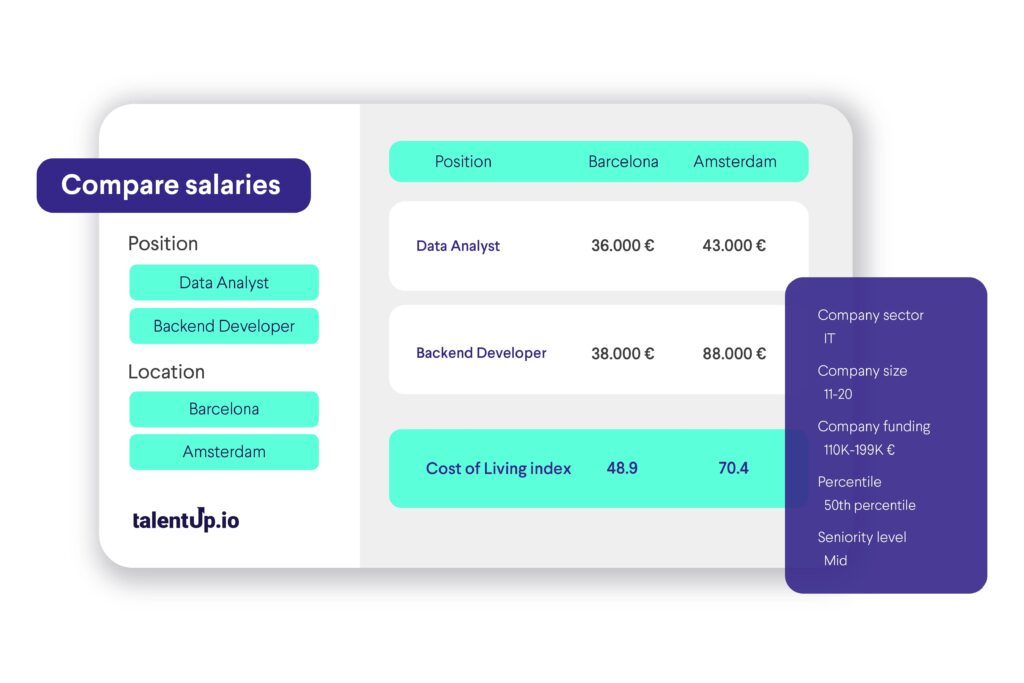
    TalentUp’s Compare Salaries feature is designed to help HR professionals evaluate how salaries for a specific role vary across different markets and under different company conditions. Whether you’re planning to expand into a new country, benchmarking global compensation, or preparing for relocation offers, this feature offers the context and insights you need.


    What Is the Compare Salaries Feature?

    This tool allows you to:

    • Compare salaries for a single role across multiple locations
    • Use a reference city or country to measure % differences
    • Apply filters like company size, funding, and sector
    • Understand cost-of-living and job market differences by location

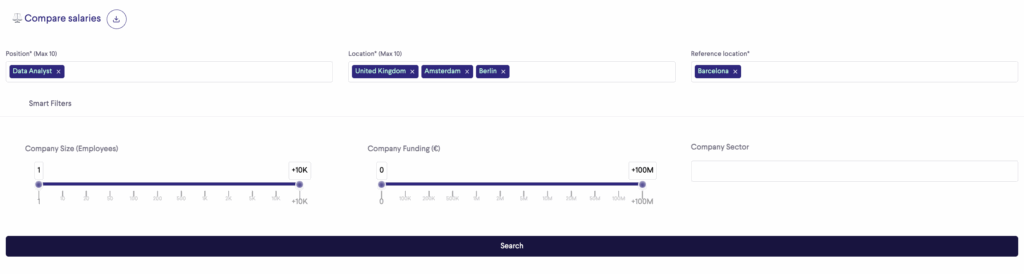
    How to Perform a Salary Comparison Search

    1. Select up to 10 Positions
      Use the dropdown menu to search and select the role(s) you want to compare. TalentUp provides a vast list of predefined job titles grouped by department (e.g., Engineering, Sales, HR, IT).
    2. Select up to 10 Locations
      Choose the cities or countries you’d like to compare. This enables a side-by-side view of salaries across different markets.
    3. Set a Reference Location
      Select one location (e.g., Barcelona) as your benchmark. All other salaries will be shown as a percentage increase or decrease relative to this location.
    4. (Optional) Apply Smart Filters
      To fine-tune your comparison, you can filter by:
      • Company Size (based on number of employees)
      • Company Funding (relevant for startups and tech)
      • Company Sector (e.g., Fintech, Education, Healthcare)

    Then click Search to generate the comparison table.
    [IMG1]https://talentup.io/apidocumentation/wp-content/uploads/2025/04/Compare-Salaries-1.png[IMG2]


    Understanding the Results

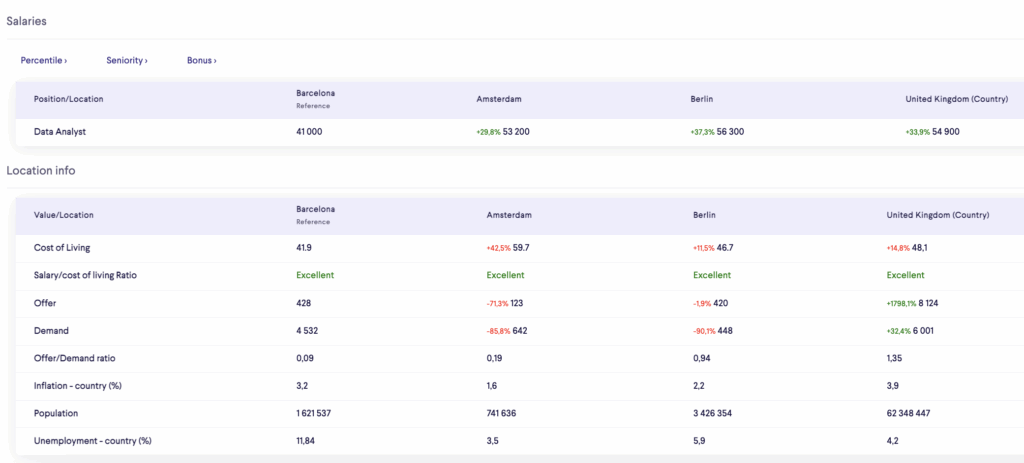
    1. Salaries Table

    This section shows the average gross salary for the selected role in each location, including:

    • Reference Location Salary
      The actual salary in your selected base location.
    • Salary in Other Locations
      Displayed both as a number and as a % difference from the reference.

    Example
    For a Data Analyst with Barcelona as the reference:

    • Barcelona: €41,000
    • Amsterdam: €53,200 (+29.8%)
    • Berlin: €56,300 (+37.3%)
    • UK (country): €54,900 (+33.9%)

    This helps you understand where talent is more expensive or more affordable.

    [IMG1]https://talentup.io/apidocumentation/wp-content/uploads/2025/04/Captura-de-pantalla-2025-04-23-a-las-16.54.29.png[IMG2]


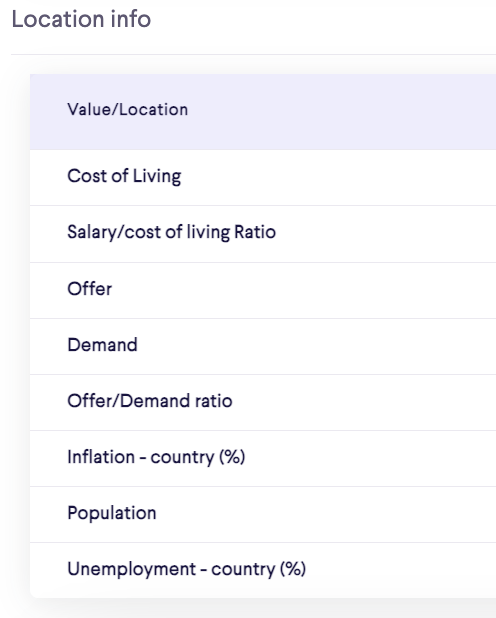
    2. Location Info: Detailed Explanation of Key Metrics

    The Location Info section appears just below the salary comparison table and provides essential background data to help interpret salary differences across cities or countries. Here’s what each metric means and how it can guide HR decisions:

    [IMG1]https://talentup.io/apidocumentation/wp-content/uploads/2025/04/Captura-de-pantalla-2025-04-23-a-las-16.55.30.png[IMG2]


    Cost of Living

    This is a relative index that reflects how expensive it is to live in a particular city or country. It considers the average cost of essentials such as:

    • Housing
    • Food and groceries
    • Transportation
    • Utilities
    • Healthcare

    How to use it:
    A higher salary doesn’t always mean a better quality of life. If the cost of living is very high, employees may actually retain less disposable income. This metric helps assess real purchasing power across markets.


    Salary / Cost of Living Ratio

    This ratio compares the average salary offered in that location with the local cost of living. It’s categorized with qualitative labels like:

    • Excellent
    • Good
    • Average
    • Low

    How to use it:
    An “Excellent” ratio indicates that the average salary allows for a comfortable lifestyle in that city. This is useful when evaluating relocation offers, setting remote worker compensation, or choosing expansion markets.


    Offer

    This is the number of active job postings for the selected role in that location. It reflects the hiring activity and market demand for the role.

    How to use it:
    A high number of offers suggests strong competition for talent. This can influence recruitment difficulty, time to hire, and expected compensation ranges.


    Demand

    Represents the estimated number of available professionals in the market who match the selected role.

    How to use it:
    This metric shows talent availability. Comparing it with the number of offers helps you understand whether the market is saturated with talent or if you’re entering a competitive hiring environment.


    Offer / Demand Ratio

    This is the ratio between job offers and available professionals:

    • A ratio below 1 indicates that supply exceeds demand, meaning more professionals are available than jobs.
    • A ratio above 1 indicates high demand, with more job offers than qualified professionals.

    How to use it:
    This ratio helps you measure recruitment difficulty. A low ratio means it may be easier to hire, while a high ratio suggests a talent shortage and higher salary pressure.


    Inflation – Country (%)

    Shows the annual inflation rate in the country. It reflects how quickly prices are increasing for goods and services.

    How to use it:
    This is important for salary adjustment planning, especially for long-term compensation policies or multi-year contracts. High inflation may erode the real value of compensation.


    Population

    Indicates the total population of the city or country. It provides general context about market size and labor force availability.

    How to use it:
    Useful when evaluating market saturation, expansion potential, and talent pool size. A larger population doesn’t always mean more talent—it depends on education levels, skill development, and industry presence.


    Unemployment – Country (%)

    The percentage of the working-age population that is actively looking for jobs but is currently unemployed.

    How to use it:
    This helps assess overall labor market health. Higher unemployment can mean a wider available talent pool, while lower unemployment suggests stronger competition and tighter markets.


    Why This Data Matters

    Salary comparisons alone don’t tell the full story. The Location Info section provides critical context for:

    • Determining real compensation value
    • Setting location-adjusted salary bands
    • Assessing hiring risk and timelines
    • Identifying cities with competitive advantages for recruitment

    Whether you’re expanding, relocating, or benchmarking remote roles, these indicators help you move from raw numbers to actionable insights.


    Practical Use Cases

    • International salary benchmarking
    • Remote work package planning
    • Compensation design for global teams
    • Strategic hiring location decisions

    Relocation offers and cost equalization

  • 2.2. Internal Pay Analysis

    TalentUp’s Internal Pay Analysis feature is designed to help HR teams gain full visibility over their workforce compensation in relation to the external market. It offers a structured, data-driven way to monitor salaries, identify pay gaps, and make fair, competitive decisions at scale.

    Whether you’re preparing for annual reviews, auditing internal equity, or building a compensation strategy, this tool makes it easy to analyze salaries in context—by role, location, seniority, and more.


    What Can You Do in the “Internal Pay Analysis” Section?

    This feature allows you to:

    • Upload and track employee compensation data
    • Filter your team by key attributes (role, location, department, etc.)
    • See how each employee’s salary compares to the market average
    • Flag potential issues like underpaid staff, retention risk, or internal inequality


    How It Works: Key Components

    1. Filtering Options

    At the top of the interface, you’ll find powerful filters that allow you to search and segment your employee database. You can filter by:

    • Name – Search specific employees directly
    • Position – Filter by job title or role
    • Department – Group employees by department (e.g., IT, HR, Sales)
    • Seniority – Segment by experience level (e.g., junior, mid, senior, lead)
    • Salary Range – Set minimum and maximum thresholds
    • Location – Filter by city or country
    • Label – Tag employees into lists (e.g., “Active,” “Risk loss,” “Unequal salary”)

    This lets you isolate high-priority groups, such as:

    • All junior developers in Spain
    • All under-market employees in your sales department
    • All senior-level roles with retention risk

    2. Employee Table Overview

    Once filters are applied, the system displays all matching employees in a structured table, including:

    ColumnDescription
    PositionThe employee’s job title
    DepartmentThe department they belong to
    SeniorityTheir experience level (junior, mid, senior, etc.)
    SalaryTheir current gross annual salary and currency
    Compa RatioRatio between their salary and the market benchmark
    Benchmark PositionWhether the salary is Below, At, or Above market average
    LocationCity and country where the employee is based
    LabelTags to help track status or performance (e.g., Active, Risk loss, Unequal)

    What Is the Compa Ratio?

    The Compa Ratio compares an employee’s salary to the current market median for the same role and location.

    • 1.00 = Market average
    • < 1.00 = Below market
    • > 1.00 = Above market

    Why it matters:
    This helps ensure pay equity across regions, roles, and levels. It can also guide promotion and raise decisions, helping prevent talent loss due to under-compensation.


    Use Case Examples

    • Retention Risk Identification
      Spot employees with below-market salaries who might be at risk of leaving.
    • Equity Audits
      Ensure employees with similar roles and performance are paid fairly.
    • Compensation Planning
      Prepare data-backed salary proposals during review cycles.
    • Headcount Strategy
      Understand how your internal salary structure aligns with the market to optimize budgets.

    Additional Features

    • + New List: Create and save filtered lists of employees for specific projects (e.g., upcoming salary reviews or D&I audits).
    • Labels: Tag employees with internal status indicators like “Active,” “Risk Loss,” or “Unequal Salary” to monitor key cases.

    Upload Functionality: Import employee data via CSV (Premium accounts only).

  • 1.2. Methodology and Data Science

    TalentUp’s platform is built on a rigorous, transparent, and scalable methodology that ensures the salary intelligence it delivers is accurate, consistent, and actionable. The combination of high-volume data collection, intelligent normalization, machine learning models, and human validation results in one of the most robust compensation benchmarking systems available.


    Where Does the Data Come From?

    TalentUp collects compensation data from a diverse mix of reliable sources, ensuring a comprehensive and representative view of the job market:

    • 72% Job Boards
      The majority of TalentUp’s data comes from public job portals such as LinkedIn, Indeed, Monster, InfoJobs, Adzuna, and hundreds of others. These listings are scraped daily to capture job descriptions, salary offers, location, benefits, and company metadata—creating a rich pool of real-time market information.
    • 17% Employee-Submitted Profiles on TalentUp.io
      Employees can submit their compensation details through the TalentUp platform. These submissions are carefully validated by comparing them against similar job roles, companies, and locations, ensuring the data is accurate and relevant.
    • 11% HR Datasets from Client Companies
      TalentUp clients can upload anonymized internal compensation data via Excel templates or integrations with HR platforms like Personio and BambooHR. This data undergoes thorough review and is only included if it was updated in the current year, enhancing both accuracy and freshness.

    4-Step Data Process

    To ensure data integrity and usability, TalentUp follows a four-step methodology: Collection, Normalization, Deduplication, and Validation.

    1. Collection

    TalentUp collects over 20,000 new salaries per day from 300+ sources across 70+ countries and 600+ job roles. This large-scale intake provides the foundation for both volume and geographic diversity. In addition to salaries, other data points include bonuses, job descriptions, responsibilities, company information, and benefits.

    2. Normalization

    Once collected, all data is standardized to allow meaningful comparison across different geographies and company types. This includes:

    • Currency Conversion: Salaries from international sources are automatically converted based on daily exchange rates to ensure consistency.
    • Job Title Translation: TalentUp’s taxonomy includes over 32,000 mapped roles in multiple languages, ensuring job titles are interpreted uniformly.
    • Benefit Standardization: Common benefits (e.g., health insurance, remote work, stock options) are interpreted and normalized, even when described differently across sources.

    This process ensures that a “Software Engineer” in São Paulo can be fairly compared with the same role in Berlin or Toronto, regardless of how the data was originally submitted.

    3. Deduplication

    To maintain the integrity of the dataset, duplicate listings and repeated job offers are filtered out using natural language processing (NLP) algorithms. These algorithms detect semantic duplicates and similarities in job descriptions and employer metadata. This step ensures every data point is unique, reducing noise and inflating values.

    4. Validation

    TalentUp applies both automated and manual validation processes to guarantee reliability:

    • Benchmark Comparison: If there are sudden changes in benchmark values (e.g., a 20% salary increase in a city-role combo), the system flags the anomaly for further review.
    • Sample Size Threshold: A minimum of 30 samples per position and location is required to build a benchmark. This ensures statistical reliability in the data.
    • Manual Cross-Check: If the data significantly deviates from historical benchmarks or industry standards, TalentUp’s team performs a manual review and cross-verification with partner sources.

    All benchmarks are refreshed every 1–2 months, keeping the platform current and dependable.


    Predictive Modeling

    When data is sparse for a specific role, city, or level of seniority, TalentUp uses predictive analytics to fill the gaps—ensuring continuity in insights without compromising reliability.

    • Linear Regression Models
      TalentUp applies linear regression models to estimate salary trends based on seniority and experience. These models are fine-tuned to reflect realistic compensation growth over time, ensuring that predicted values align with expected career progression.
    • Correlation Across Similar Markets
      If direct data is unavailable for a given city, TalentUp predicts salary benchmarks by leveraging correlations with similar locations, industries, or company sizes. This allows for salary forecasting even in less saturated data regions.
    • Data Completion
      Predictive modeling allows TalentUp to offer comprehensive salary ranges—from base pay to bonuses—even when only partial data is available. This enhances the usability of the platform and ensures a consistent experience across all roles and locations.

    Confidence Ratio

    The Confidence Ratio is a simple 0–1 score that indicates how reliable a salary benchmark is.

    It brings together three essential factors:

    • Sample size – how much data is available
    • Distribution quality – how consistent the reported salaries are
    • Data freshness – how recently the information was collected

    The higher the score, the more accurately the benchmark reflects the real market.

    • 0.8–1.0 → Highly reliable
    • 0.6–0.8 → Solid and trustworthy
    • Below 0.6 → Useful as a general guide, but less precise

    This metric makes it easy to quickly assess the quality of salary data across countries, roles, and industries.

    To help interpret this data visually, we include graphics showing the Confidence Ratio across regions such as Europe, Asia, America, and Africa. This makes it easy to see where the salary data is most strong.

    Europe Confidence Ratio:

    Asia Confidence Ratio:

    America Confidence Ratio:

    Africa Confidence Ratio:

    Oceania Confidence Ratio:

  • 2.1. Market Salary Search

    The Market Salary Search feature is the starting point for exploring real-time, market-aligned compensation insights on TalentUp. Designed for HR professionals, recruiters, and compensation analysts, this tool enables you to quickly access and compare salary data for any role in any location—across industries and company types. Whether you’re preparing an offer, running an internal salary audit, or benchmarking compensation strategy, this feature provides you with access to TalentUp’s extensive market intelligence—based on millions of validated data points.


    What You Can Do with the “Market Salary Search” Feature

    • Search by job title or job description
    • Analyze gross, net, company cost, or contractor salary
    • Filter results by company size, funding, sector, and type
    • View market salary distribution by seniority
    • Explore variable compensation, supply and demand, gender gap, and benefits

    How to Perform a Salary Search

    The Market Salary Search feature allows users to research and analyze salaries for specific roles in a chosen location. It provides not only the average salary but also a complete breakdown of total compensation, market dynamics, and benefits. Below is a detailed explanation of how to perform a search and how to read each part of the results page.


    Step 1: Perform a Search

    At the top left of the page, you will find the search bar. Here you can enter the job title you want to investigate. For example, typing “Data Scientist” will display information about salaries for that role. Next, enter the location in the second search box. In this case, “Berlin” is used as an example.

    [IMG1]https://talentup.io/apidocumentation/wp-content/uploads/2025/04/Captura-de-pantalla-2025-11-07-a-las-13.39.17.png[IMG2]

    Once both fields are completed, click on the Search button. The platform will then generate a detailed salary report for that role and location.

    Additionally, there are filters available below the search bar to refine the results further. It is especially important to narrow the search to the specific industry you are recruiting talent for, as compensation levels can vary widely between fields.

    You should always align the filters with the types of companies where the talent currently works or with those where you are competing for talent. For instance, even if you are a startup but are looking for talent from larger companies, you should adapt the filters to reflect those organizations rather than your own.

    These filters include:

    • Sector: Allows you to specify the industry or field (e.g., IT, healthcare, finance). Salaries can differ significantly depending on the sector.
    • Type: This function lets users select their company type (Startup, Scaleup, International, IT Consultancy, or Research/SMB) to refine and personalize salary data. Choosing the correct type ensures more accurate and context-specific compensation insights.
    • Number of employees: Refers to the number of employees in the organization.
    • Funding: Useful when analyzing startups. It shows whether the company is early-stage with limited budgets or well-funded with greater resources to pay higher salaries.
    • Peer group: Lets you compare specific sets of companies or competitors against each other.

    Applying these filters helps narrow down the data to more relevant results tailored to the specific situation you are analyzing.


    Step 2: Reviewing the Main Salary Results

    Once the search is complete, the right side of the page displays the main salary summary. This is the most prominent information and is intended to give a quick but comprehensive overview of how much professionals in the selected role and location earn.

    [IMG1]https://talentup.io/apidocumentation/wp-content/uploads/2025/04/Captura-de-pantalla-2025-11-07-a-las-13.56.55.png[IMG2]

    The first number to focus on is the Total Market Compensation. This combines three elements:

    • Base Salary: The fixed annual pay without bonuses or additional incentives.
    • Average Bonus: Variable pay that employees may receive based on performance, company results, or individual agreements.
    • Average Stock Options: The average value of equity compensation offered by companies, more common in startups and tech firms.

    Together, these three elements show the full earning potential. For example, in the screenshot, the base salary is 46,600 €, the average bonus is 4,500 €, and the average stock options value is 7,600 €, resulting in a total market compensation package of 51,100 €.

    Alongside this breakdown, the system provides a Confidence score. This value indicates how reliable the data is, based on the quantity and quality of available information. In this case, the confidence level is marked as “Excellent,” which means the figures are based on solid and sufficient market data.

    Finally, there is a Market Competition indicator. This shows how difficult it is to secure jobs for this role in the given location. It explains whether there are more candidates than available jobs (which drives competition up and salaries down) or if demand is higher than supply (which benefits job seekers). In the example, competition is considered a “Balanced Market” .


    Step 3: Exploring the Pay Table

    The pay table provides a more detailed look at salary distribution across different percentiles or experience levels. Instead of showing just an average, it highlights how salaries are spread out in the market.

    [IMG1]https://talentup.io/apidocumentation/wp-content/uploads/2025/04/Captura-de-pantalla-2025-11-21-a-las-13.24.10.png[IMG2]

    The percentiles are usually represented as follows:

    • P10: The 10th percentile. Salaries at this level represent entry-level or the lowest-paid professionals in the role.
    • P25: The 25th percentile. This typically represents junior professionals with some experience.
    • P50 (Median): The 50th percentile. This is the middle point, meaning half of the professionals earn less and half earn more.
    • P75: The 75th percentile. Represents more experienced professionals, often at mid-to-senior levels.
    • P90: The 90th percentile. Salaries at this level usually correspond to senior or highly specialized professionals at the top of the pay range.

    This section allows you to see how much progression is possible in terms of pay as you gain experience or move into higher levels of responsibility.

    [IMG1]https://talentup.io/apidocumentation/wp-content/uploads/2025/04/Captura-de-pantalla-2025-11-21-a-las-13.24.23-1.png[IMG2]

    In the pay table, you can switch between different grading frameworks (TalentUp Seniority, TalentUp Levels, Gradar, Korn Ferry, Mercer, Radford, WTW Career Level, WTW Global Grade).

    These frameworks are essentially job-leveling systems used by companies to benchmark roles and compare compensation fairly across the market.

    When you select a grading system in the menu (e.g., TalentUp Seniority or Korn Ferry), the pay table restructures the data according to that framework’s job levels.

    This means the salary percentiles (P10, P25, P50, P75, P90) you see will correspond to the levels defined by that specific system.

    Benefits of choosing a grading system

    1. More accurate benchmarking
    Different companies use different leveling systems. Selecting the one that matches your organization (or the one you want to compare with) gives you a far more accurate compensation benchmark.

    2. Apples-to-apples comparisons
    Instead of guessing whether “Senior” in one framework equals “Level 4” in another, you simply switch grading systems and see salaries aligned exactly with that structure.

    3. Better internal alignment
    If your company uses Korn Ferry, WTW, or Mercer grades, setting it as default ensures your team always sees compensation data in your internal language.

    4. Easier external comparisons
    For candidates, recruiters, or HR teams working across multiple companies, switching gradings helps compare roles that use different terminology.

    5. Flexibility and customization
    You can select a system temporarily or set one as the default to keep the table aligned with your preferred framework.


    Step 4: Market Insights

    [IMG1]https://talentup.io/apidocumentation/wp-content/uploads/2025/04/Captura-de-pantalla-2025-11-21-a-las-13.51.09.png[IMG2]

    The Market Insights section provides context about the balance between supply and demand in the labor market for the selected role and location.

    • Supply shows the number of professionals available in the market.
    • Demand shows the number of open job offers for that role.

    If supply is higher than demand, competition for jobs is strong, and salaries may stagnate or even decrease. If demand is higher than supply, companies need to compete to attract candidates, which generally leads to better salaries and benefits for professionals.

    In addition, this section often contains a Gender Gap analysis. It displays the percentage of male and female professionals in the role and may show salary differences between genders. This helps organizations and professionals understand diversity dynamics and whether there are disparities in compensation.


    Step 5: Benefits Information

    [IMG1]https://talentup.io/apidocumentation/wp-content/uploads/2025/04/Captura-de-pantalla-2025-11-21-a-las-13.51.29.png[IMG2]

    Salaries are not the only factor in compensation. TalentUp also provides information about benefits commonly offered by employers. These are divided into several categories:

    • Most common benefits: These include professional development budgets, health insurance, and access to cutting-edge technology. These are frequently offered across companies in the role you are researching.
    • Side benefits to attract and retain talent: Examples include work-life balance initiatives, flexible working hours, the ability to work remotely, and being recognized as an equal opportunity employer. These benefits are increasingly important for candidates and play a big role in employer attractiveness.
    • Statutory benefits: These are benefits required by law, such as social security contributions, minimum wage compliance, paid time off, sick leave, and pension contributions. While these are mandatory, their value can still be included in the analysis to show the full picture of what employees receive.

    This section ensures users do not focus solely on base salaries but consider the broader package that contributes to employee satisfaction.


    Step 6: Participants (Benchmarking Companies)

    Another feature on the results page is the list of participants. These are companies included in the benchmark for the selected role. Sometimes these are organizations that actively share data, and other times they are companies identified as relevant players in the market for that role.

    For instance, the screenshot lists companies like Google as participants. This gives you an idea of which employers are driving the salary levels for the role in the selected location.


    Step 7: Feedback and Evaluation

    At the bottom right of the page, there is a section where users can rate the page or share feedback. This feature allows TalentUp to improve the quality of its data and the usability of the platform based on user input.


    Why Market Salary Search Is Valuable

    The Market Salary Search feature is not limited to showing a single salary figure. Instead, it offers a comprehensive overview of:

    • The base salary and total compensation package.
    • Salary progression across levels of experience.
    • Market conditions such as supply and demand.
    • Gender representation and possible pay gaps.
    • Benefits, both common and statutory, that complement salaries.
    • The companies involved in shaping the salary benchmarks.

    For professionals, this information is critical to prepare for salary negotiations, assess career prospects, and choose the right employers. For companies, it provides valuable benchmarking to ensure they remain competitive in attracting and retaining talent.